Witchspire Beginner & Co-op Guide
To start Witchspire: pick a coven, catch and bond a starter familiar, then build your first Hearth to unlock crafting, Luminaries and (by Lv7) the broom. Co-op is online and player-hosted for up to 6 players.
13 tips & tricks (watch first)
 Witchspire — 13 Tips & Tricks for Beginners
 Your first hour, step by step
Witchspire is a cozy survival game with no hunger or thirst meters, so your first hour is about setting up a home and a familiar rather than scrambling for food. Follow this order.
- 01
Pick your coven
You choose one of the 6 covens at the start. This shapes your early flavor and starting area.
💡 Unsure? Try the coven quiz, or read the coven comparison first — it is not a locked-forever combat class.
- 02
Catch and bond a starter familiar
Find a wild spirit and use the bonding mechanic to make it your first familiar. Familiars fight and gather alongside you.
💡 Some familiars only appear at night — note the day-night cycle.
- 03
Place your first Hearth
The Hearth is your home anchor and the center of your build radius. Drop it somewhere central before you build anything else.
- 04
Unlock crafting and Luminaries
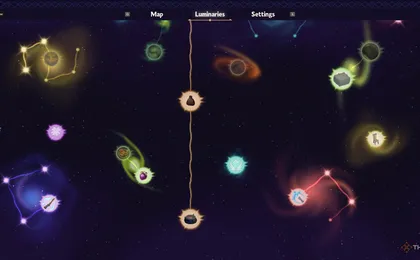
With a Hearth down, start crafting basics and spending into the Luminaries skill tree to open new tools and recipes.
- 05
Work toward the broom
The broom unlocks at Lv7 via the Main Quest "Take to the Skies" — it needs Hearth Lv4 plus Fine Wood, Spirit Dust and a Flight Pillar.
💡 See the broom-unlock page for the full material chain.
There are no hunger, thirst or energy bars in Witchspire. Food exists only to heal you, so explore and build at your own pace instead of farming meals.
Default controls
These are the default PC bindings; Witchspire is PC-only in Early Access.
Default keyboard & mouse layout — rebindable in Settings.
| Action | Default key |
|---|---|
| Move | W / A / S / D |
| Jump | Space |
| Sprint | Shift |
| Interact / pick up | E |
| Attack / cast | Left Mouse |
| Secondary / aim | Right Mouse |
| Open inventory | Tab |
| Build / astral mode | B |
| Map | M |
How to play co-op with friends
Witchspire co-op is online and player-hosted: one player opens their world and invites others through Steam. There are no dedicated servers and no crossplay.
| Co-op detail | Answer |
|---|---|
| Max players | 6 (4 recommended for performance) |
| How to join | Host opens their world; friends join via Steam invite |
| Platform | Steam / PC only |
| Dedicated servers | No — host must be online |
| Crossplay | No |
| Progress carryover | No demo carryover into the EA game |
Because co-op is host-based with no dedicated servers, the shared world is only available while the hosting player is in the session. Plan around whoever owns the save.